
Dziś samo hasło, nawet najdłuższe, to za mało.
W 2025 roku Polska stała się jednym z najczęściej atakowanych krajów w Europie. Liczba incydentów obsłużonych przez CERT Polska przekroczyła 260 tysięcy, co oznacza wzrost o 150% rok do roku. Najgorsze jest to, że aż 97% tych zagrożeń to phishing – proste oszustwa, które mają wyciągnąć od nas login i hasło.
Multi-Factor Authentication (MFA)
Bądźmy realistami: w świecie wycieków danych i coraz sprytniejszego phishingu, poleganie wyłącznie na haśle to spore ryzyko. Nawet najsilniejszy ciąg znaków może zostać przejęty, jeśli trafi na odpowiednio przygotowaną pułapkę lub złośliwe oprogramowanie.
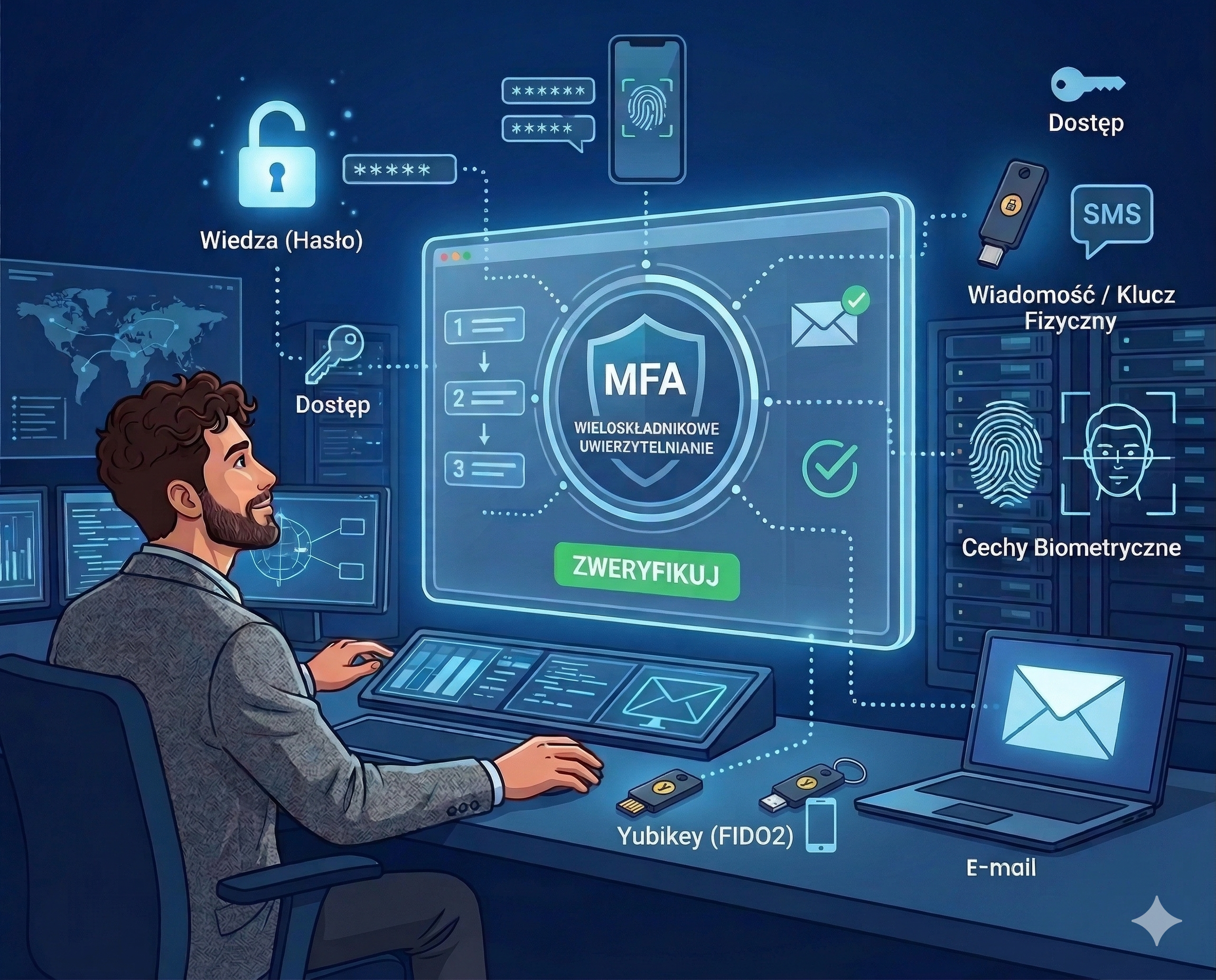
Multi-Factor Authentication (MFA), czyli wieloskładnikowe uwierzytelnianie, to po prostu dodatkowa warstwa ochronna dla Twoich kont. Idea jest prosta: aby się zalogować, nie wystarczy już tylko coś wiedzieć (hasło), trzeba też coś mieć (np. telefon lub klucz fizyczny). Dzięki temu, nawet jeśli haker zdobędzie Twoje dane logowania, i tak utknie przed zamkniętymi drzwiami, bo nie będzie w stanie przejść przez drugi etap weryfikacji.
Co warto wdrożyć?
SMS to przeszłość – dlaczego aplikacje są lepsze?
Większość z nas zaczyna od kodów SMS, bo to znamy z bankowości. Ale prawda jest taka, że hakerzy potrafią przejąć kartę SIM (tzw. SIM swapping) lub podejrzeć kod na zablokowanym ekranie. Aplikacje takie jak Microsoft Authenticator czy Google Authenticator są o krok dalej – token generuje się lokalnie na Twoim urządzeniu i nigdy nie “lata” w sieci jako wiadomość tekstowa.
Zgubiłem telefon i co teraz?
To największy strach użytkowników: “Co jeśli telefon wpadnie do wanny?”. Spokojnie, od tego są kody zapasowe (recovery codes). Przy włączaniu MFA system każe Ci je zapisać – to Twój cyfrowy klucz zapasowy, który trzymasz w bezpiecznym miejscu (nie w telefonie!). Warto też mieć zaufane urządzenie pomocnicze, które pozwoli Ci odzyskać dostęp bez paniki.
Passkeys – pożegnanie z hasłami
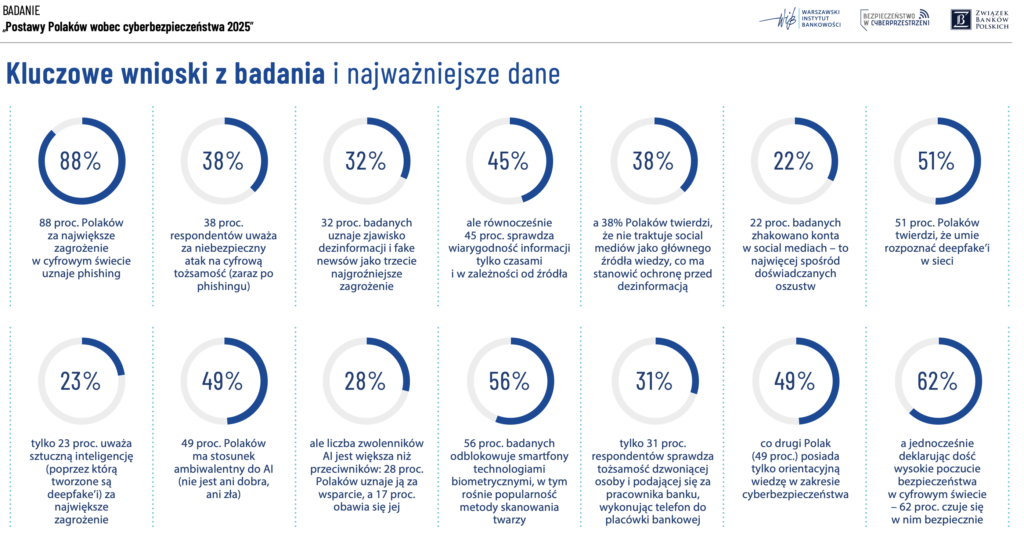
Skoro 56% z nas używa biometrii (jak widać w badaniach), to Passkeys są naturalnym krokiem. To technologia, która zamienia Twoją twarz lub odcisk palca w cyfrowe hasło. Nie musisz nic pamiętać, niczego wpisywać, a bezpieczeństwo jest znacznie wyższe niż w tradycyjnym modelu.
Klucze U2F – najwyższy poziom wtajemniczenia
Najwyższym standardem ochrony są obecnie fizyczne klucze U2F, takie jak YubiKey. To fizyczny klucz, który wpinasz do komputera. Nawet jeśli podasz hakerowi login, hasło i kod z aplikacji, on i tak nie wejdzie, bo nie ma fizycznie tego klucza w Twoim porcie USB. To jedyna metoda w 100% odporna na phishing.
Co mówią liczby? (Badanie Postawy Polaków 2025)
Z badania Warszawskiego Instytutu Bankowości wynika, że aż 62% z nas czuje się bezpiecznie w sieci. Jednocześnie te same dane pokazują, że co czwarty Polak (22%) padł już ofiarą zhakowania konta w social mediach. To pokazuje, że często bagatelizujemy zagrożenie, dopóki sami nie staniemy się celem.
Dobra wiadomość? Polacy coraz chętniej rezygnują z tradycyjnych haseł na rzecz wygody. Już 56% badanych odblokowuje smartfony biometrią, w tym skanowaniem twarzy. To idealny fundament pod wdrożenie Passkeys – technologii, która łączy tę wygodę z najwyższym poziomem bezpieczeństwa MFA.
Mimo że 88% Polaków uznaje phishing za największe zagrożenie, to tylko 31% z nas zadaje sobie trud, by zweryfikować tożsamość dzwoniącego pracownika banku, wykonując telefon zwrotny do placówki. Właśnie dlatego MFA jest tak ważne – to automatyczny bezpiecznik tam, gdzie zawodzi ludzka czujność.
Dlaczego w ITmafia traktujemy to poważnie?
Możesz pomyśleć: “Po co mi te wszystkie utrudnienia?”. W ITmafia zarządzamy infrastrukturą, serwerami i danymi naszych klientów. Dla nas bezpieczeństwo to nie jest “opcja”, to nasz system operacyjny.
Stosujemy MFA i klucze U2F u siebie i u naszych klientów, bo wiemy, że:
 Eliminuje to błąd ludzki: Nawet jeśli pracownik z pośpiechu kliknie w podejrzany link, haker i tak odbije się od ściany.
Daje święty spokój: Monitoring, który prowadzimy, pokazuje jasno – konta z MFA są praktycznie niemożliwe do przejęcia metodami masowymi.
To profesjonalne: W dobie rosnącej liczby ataków w Polsce, brak MFA to jak zostawienie otwartego biura na noc. My tak nie pracujemy.
Jak zacząć?
Wprowadzenie MFA w firmie kojarzy się czasem z oporem pracowników i chaosem przy logowaniu. My wiemy, jak zrobić to inaczej. Pomagamy przejść przez ten proces bezpiecznie i etapowo – tak, żeby nikt w zespole nie poczuł, że technologia mu przeszkadza. Wdrożenie wieloskładnikowego uwierzytelniania to tylko jeden z elementów naszej pełnej opieki w ramach usługi Infrastruktura. Dbamy o to, by wszystkie systemy Twojej firmy były odporne na współczesne zagrożenia.
Skorzystaj z formularza kontaktowego, a my oddzwonimy do Ciebie najszybciej jak to możliwe.


Comments are closed